Overview
Closing a finding is a permanent audit record. A comment like “false positive” or “accept risk” only repeats the decision that was already recorded in the status, so anyone reading the finding months later — a teammate, a new owner, an auditor — learns nothing from it. Corgea reviews the comment when you mark a finding as false positive or accepted risk and asks again when it does not explain the decision. One specific sentence that a reader could check is enough.The justification requirement applies to the comment on a status change. It does not change who is allowed to change a status, which remains controlled by the
change_issue_status permission. See Roles.Where it applies
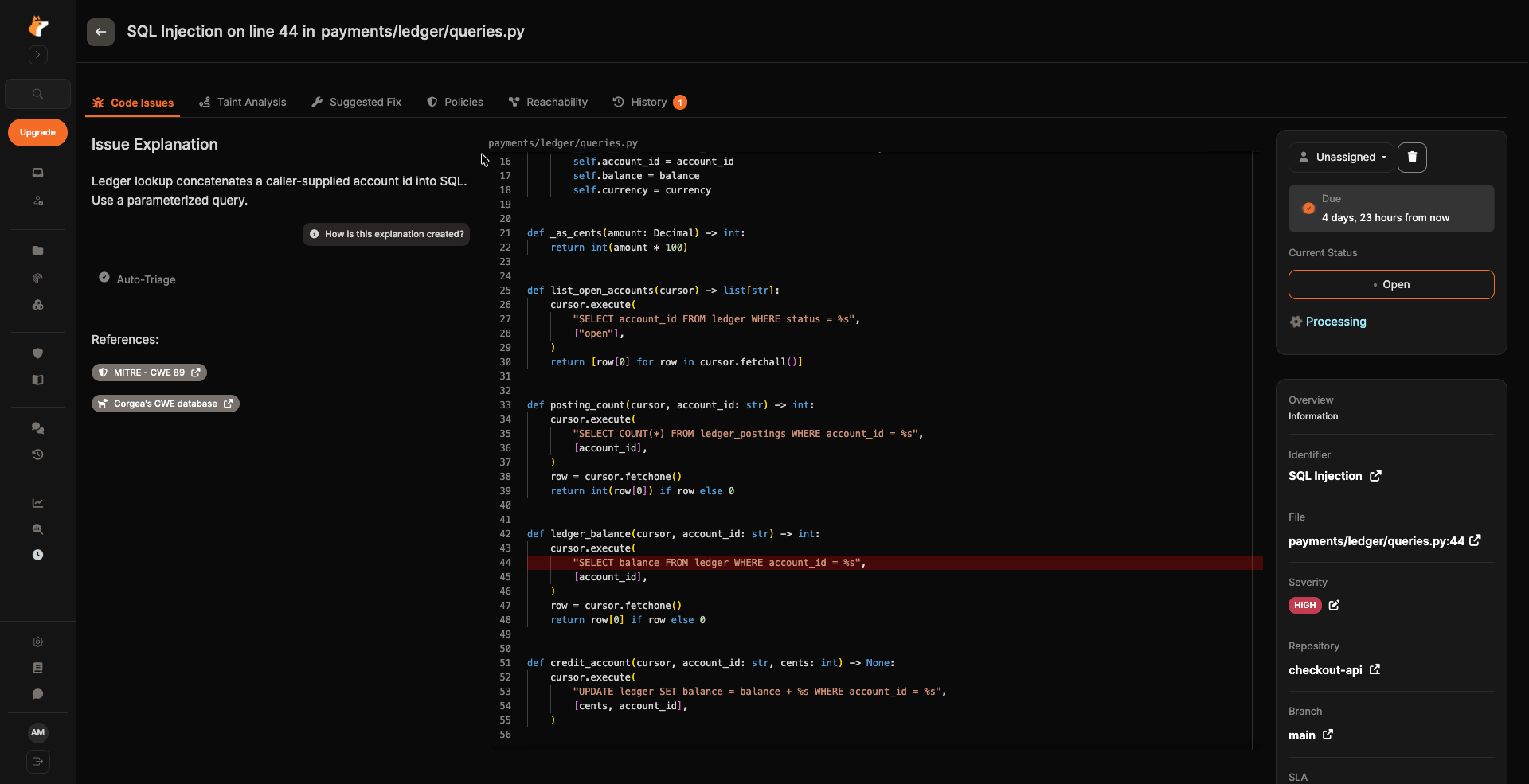
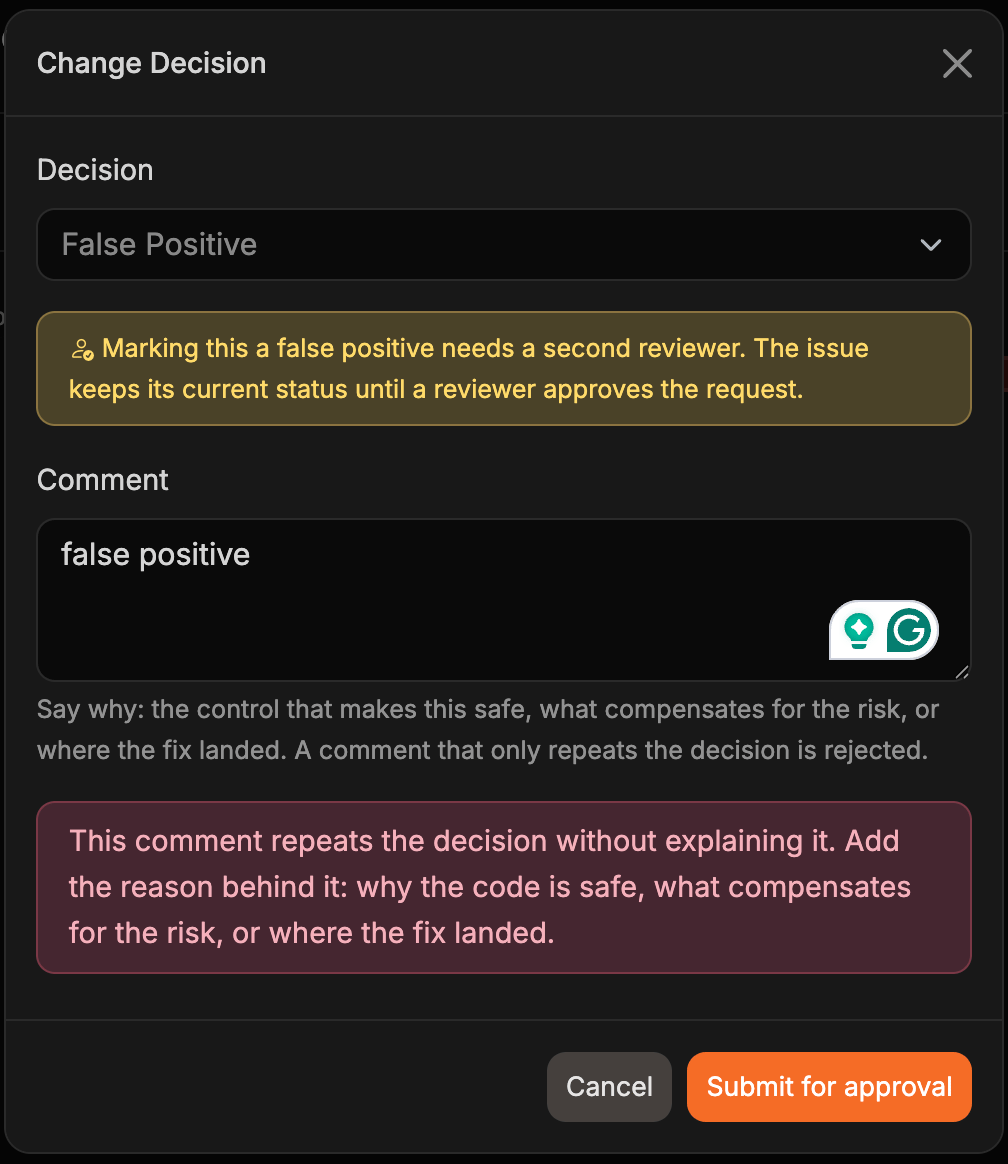
For false-positive and accepted-risk decisions, the review runs in these places:- The Change Decision modal on the finding details page
- The details drawer in the Vulnerabilities Workbench
- The bulk triage action bar, including SAST, SCA, and IaC findings
- Status changes for a single finding through the API (
PATCH /api/v1/issue/{issue_id}) - Dismissals requested from a pull request through the Corgea Agent
What makes a good justification
A justification is accepted when it names at least one concrete thing a reader could verify. Any one of these is enough:- The control that makes the code safe — input validation, output escaping, a parameterized query, an authorization check, or a framework guarantee
- Why the input is trusted or the path is unreachable in this deployment
- A compensating control or business reason for carrying the risk, ideally with an owner, a deadline, or a scope
- Where the fix landed, or which finding this one duplicates — a commit, pull request, ticket, or finding ID
- What the scanner misread about the code
What gets rejected
A comment is sent back when it adds nothing to the decision itself:
When a comment is rejected, Corgea explains what is missing and keeps what you typed so you can add to it. The status is not changed until the comment is accepted.
What Corgea never rejects for
The review looks for whether a reason is given at all, not for how well it is written.A justification is never rejected because of its length, spelling, grammar, informal tone, or the language it is written in. Justifications written in any language are reviewed on equal terms. Corgea also does not judge whether your reasoning is technically correct — that judgment stays with your team — and accepts the comment when it is unsure.
Closing a finding from a pull request
The Corgea Agent writes the same audit record when it acts on a pull request comment, so it asks for the same reason. A comment that asks to dismiss a finding without saying why —@Corgea false positive, accept risk, not an issue, wontfix — gets a reply asking for the reason instead of a status change. Include the reason in the comment and the agent records it:
Requiring a second reviewer
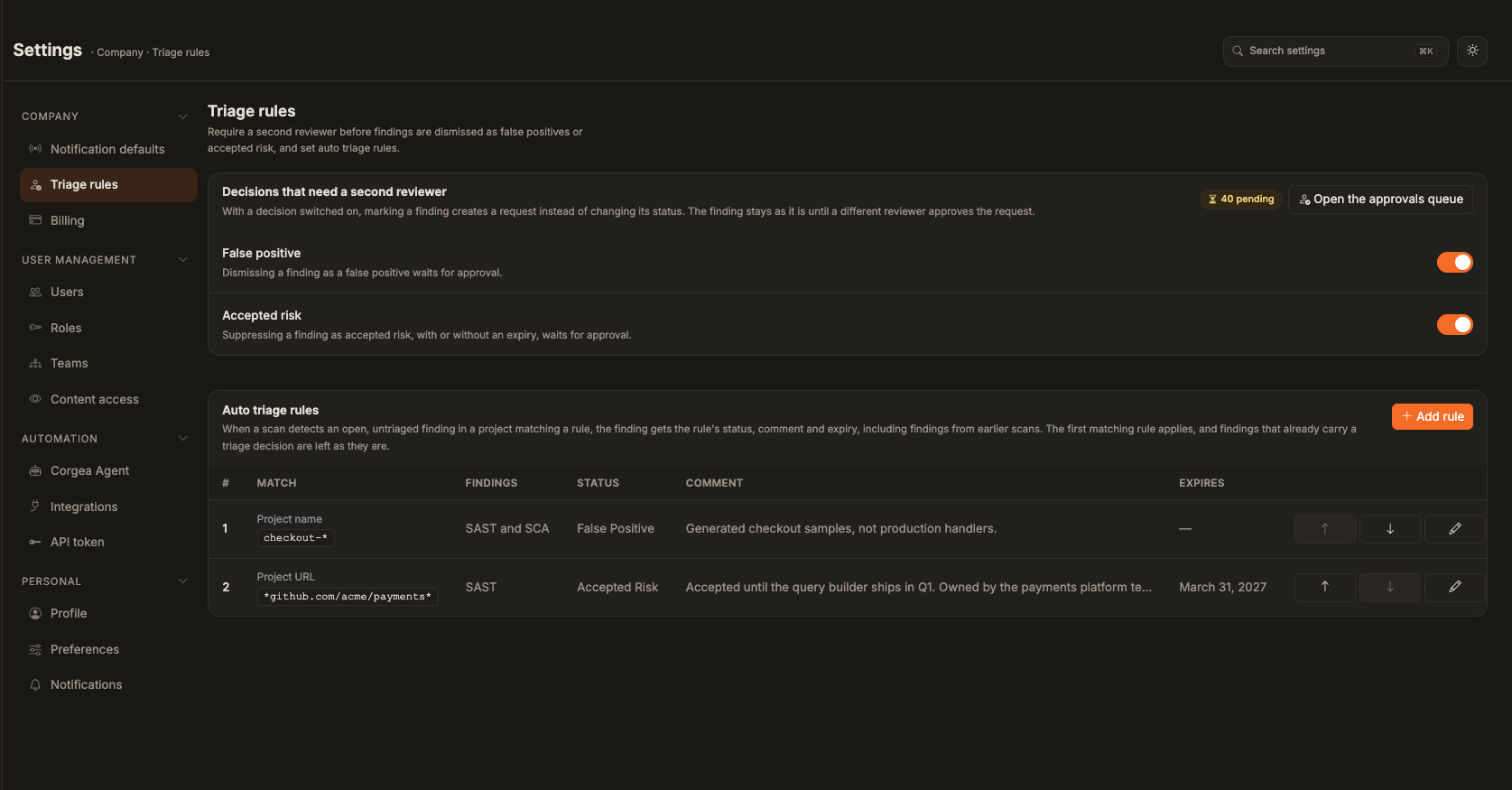
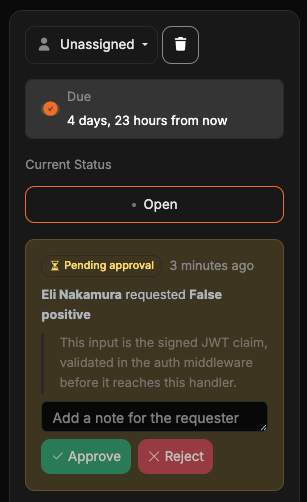
A justification explains a decision, but on its own nothing checks it. Company admins can also require that a second person approves a dismissal before it takes effect. Turn this on under Settings → Company → Triage rules (open). The page has two independent toggles, both off by default:- False positive — dismissing a finding as a false positive waits for approval.
- Accepted risk — suppressing a finding as accepted risk, with or without an expiry, waits for approval.
Reviewing requests
Reviewers work from the approvals queue at /approvals/, which has Pending, Approved, Rejected, and Withdrawn tabs. Filter by decision, project, requester, severity, and recommendation, narrow to Everyone, Waiting on me, or Mine, and search across CWE, CVE, path, project, justification, reviewer note, and requester. Filters live in the query string, so a filtered view can be shared as a link. The recommendation filter includes Has recommendation, Approve, Reject, and No recommendation. On Pending, a false-positive request is hidden when every finding on it is a code finding and the project’s latest completed full scan already marks each of those findings as a false positive. A request that includes a dependency finding stays visible. Turn on Closed by rescan to show the hidden requests. They remain pending and still need a review decision.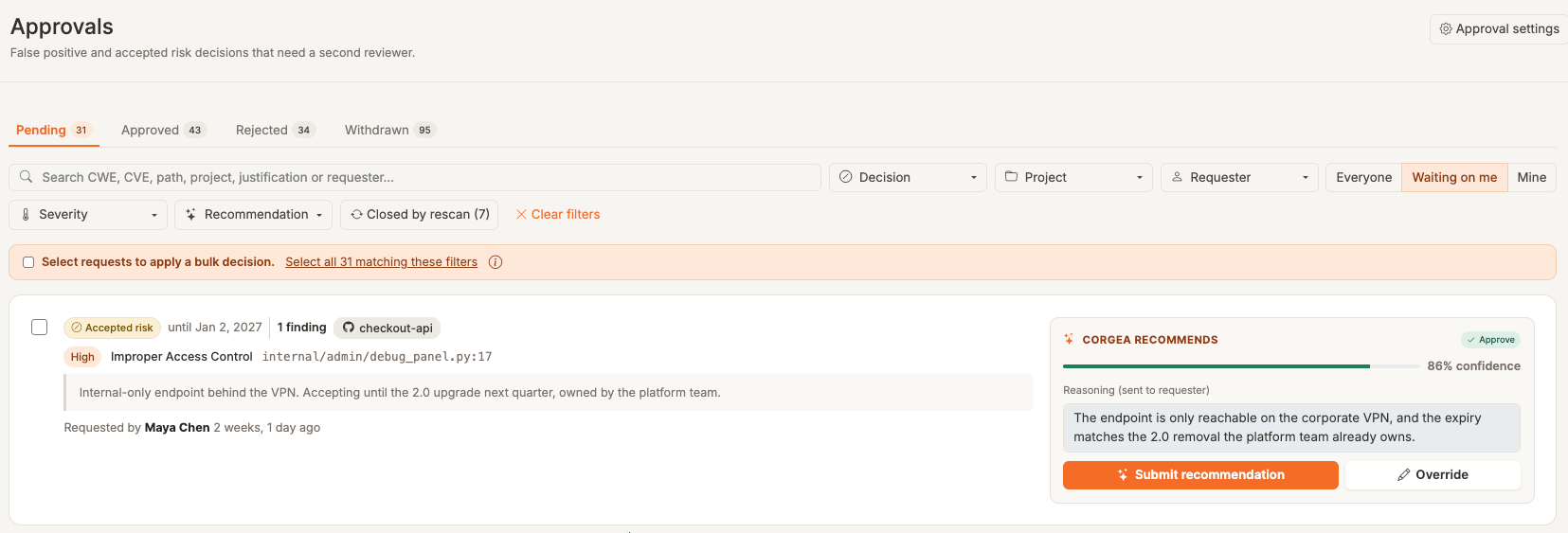
People who can approve requests are exempt from their own gate: queueing their decision would only ask them to approve themselves, so it applies immediately. Company admins see every request in the queue; everyone else sees only the requests they submitted.
Reviewing requests in bulk
On Pending, select individual requests, all reviewable requests on the current page, or all requests matching the filters. Your own requests are excluded from review selections. Choose Approve or Reject, review the confirmation dialog, and confirm the decision. You can send the same note for all requests or customize notes per request; per-request notes require an explicit selection rather than all matching requests. Pending requests submitted by an agent can also be approved by an authorized human reviewer. The confirmation dialog identifies agent-submitted requests before you apply the decision.Optional triage suggestions
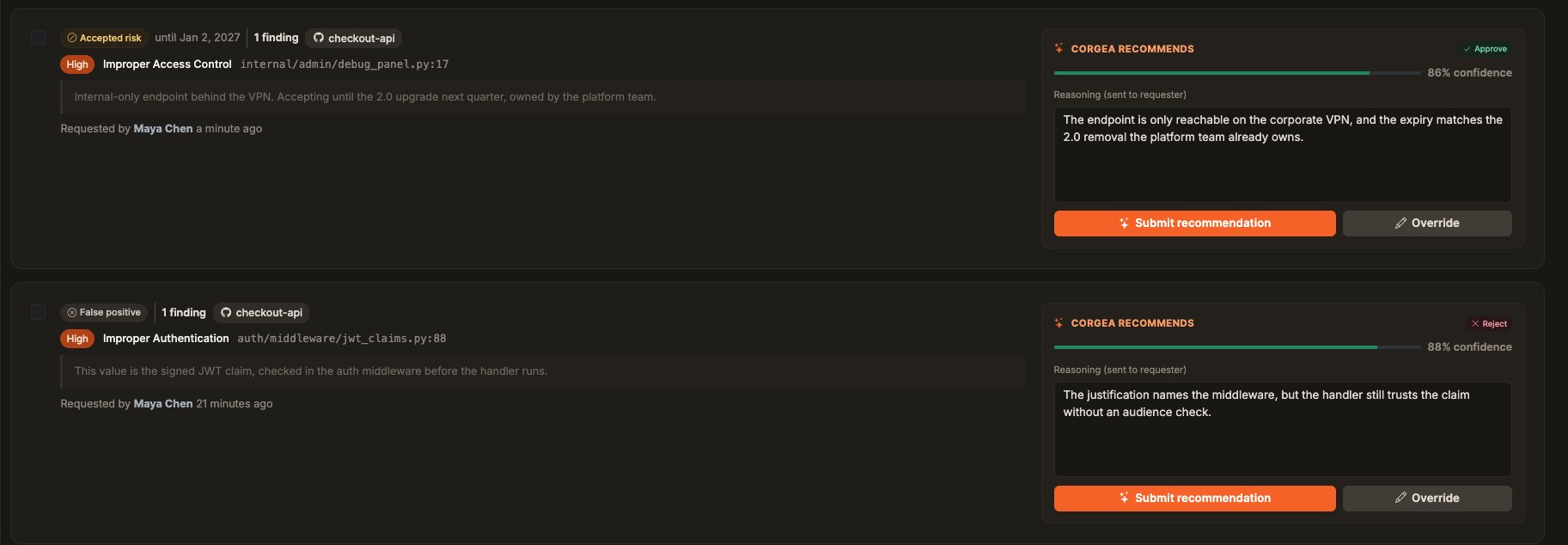
Triage suggestions are available only when enabled for your company. Corgea can draft a justification for a false-positive or accepted-risk selection in the workbench; review and edit it before submitting. For reviewers, a pending card can show Corgea recommends with Approve or Reject, a confidence indicator, and reasoning that will be sent to the requester. Submit recommendation applies that suggestion. Override changes the decision or the note. Select several requests to use Apply suggestions, which applies each selected request’s recommendation after confirmation. Requests without a recommendation still need a manual decision. Suggestions never approve or reject a request on their own.